
JWT vs OAuth vs Session-Based Authentication: Which Strategy Should You Use?
|
Getting your Trinity Audio player ready...
|
The authentication strategy is the most critical one for your application’s security. Choosing the wrong authentication method can result in scalability issues, security vulnerabilities, or increased complexity — each of which is addressed by JWT, OAuth, and session-based authentication. You’ll find out exactly how all of these methods work, where they fit, and how to select the best one for your project.
Quick Summary
| Feature | JWT | OAuth 2.0 | Session-Based |
| Storage | Client-side | Client + Auth Server | Server-side |
| Stateless | Yes | Partially | No |
| Best For | APIs, microservices | Third-party login | Traditional web apps |
| Scalability | High | High | Requires sticky sessions |
| Token Revocation | Hard | Easy | Easy |
| Complexity | Medium | High | Low |
What Is Authentication and Why Does It Matter?
Authentication is confirming the identity of a user. It’s a must-have for any web application, from a simple blog to a multi-tenant SaaS application.
Not all mobile apps require the same. A monolithic web app requires different things than a distributed microservices architecture. There are three different approaches: JWT, OAuth 2.0, and Session-Based Authentication, and that’s why.
It is important to be knowledgeable about each so that you can make educated decisions. Furthermore, if you use the wrong method you run the risk of token hijacking, session fixation attacks, or expensive re-architecture down the road.
What Is Session-Based Authentication?
The oldest and most simple authentication method is session-based authentication. A server creates a session upon a user’s logon, stores it in memory or a database, and sends a session identifier to the client in a cookie.
The browser will automatically send that cookie with each subsequent request. The server then uses the session ID to find the information belonging to that user, and follows through with handling the request.
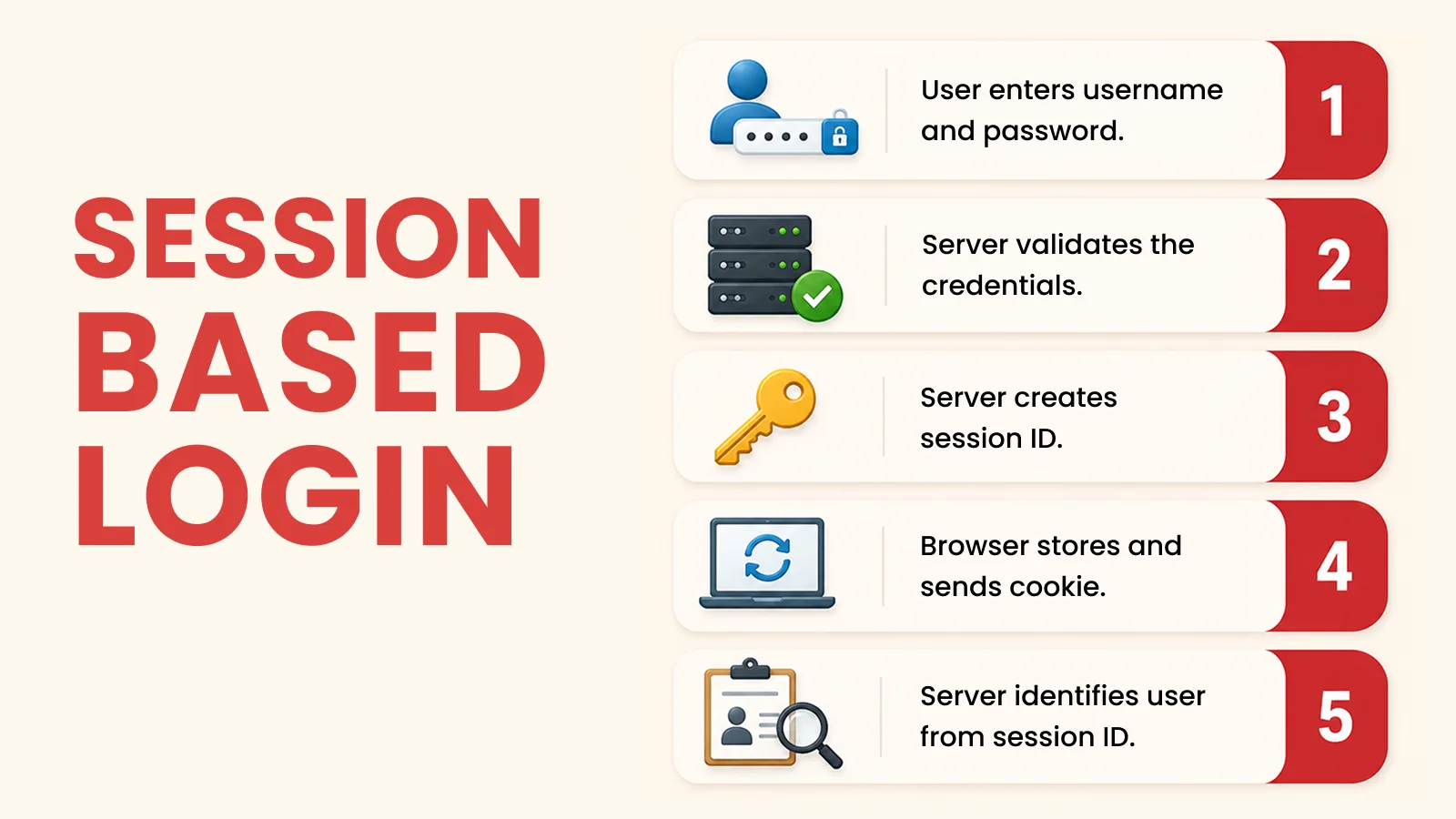
How Session-Based Auth Works (Step by Step)
- User enters username and password.
- Server validates credentials, generating session record.
- Server returns a Set-Cookie header with a session ID
- A cookie stored in the browser is sent to the browser with each request.
- Server looks up the session ID on each request to identify the user
Pros of Session-Based Authentication
- Easy to use for most frameworks (Express, Django, Rails)
- Easy to cancel — simply remove session from the server
- Good for traditional server rendered Web Apps.
Cons of Session-Based Authentication
- Stateful by nature, which creates scaling challenges
- Needs the ability to use shared session store (e.g., Redis) in distributed systems
- Suspceptible to CSRF attacks if cookies are not set-up properly
- The more active users that are using the memory, the more overhead.
When to use it: If you have a monolithic web app that doesn’t need horizontal scaling and you prefer simplicity and control, then Session-based auth is a good option.
What Is JWT (JSON Web Token) Authentication?
The JWT is known as JSON Web Token.
JWT does not store session data on the server, instead it packs the user’s identity and claims into a signed token. This token is generated at login by the server and stored by the client (usually in memory, localStorage, etc.).
The client includes the token in the Authorization header for each request. The server then checks the token’s signature, without accessing any database.
Anatomy of a JWT
A JWT is composed of three segments, each of which is base64 encoded and separated by dots: header.payload.signature
- Header (algorithm, e.g. HS256 or RS256) — algorithm used in the header (e.g. HS256 or RS256).
- Payload — Claim is a section that contains claims such as userId, role, and exp (expiration).
- Signature — Cryptographically proves that the token has not been changed
Example JWT Payload
{ “sub”: “user_123”, “name”: “Jane Doe”, “role”: “admin”, “iat”: 1716500000, “exp”: 1716503600 }
How JWT Authentication Works
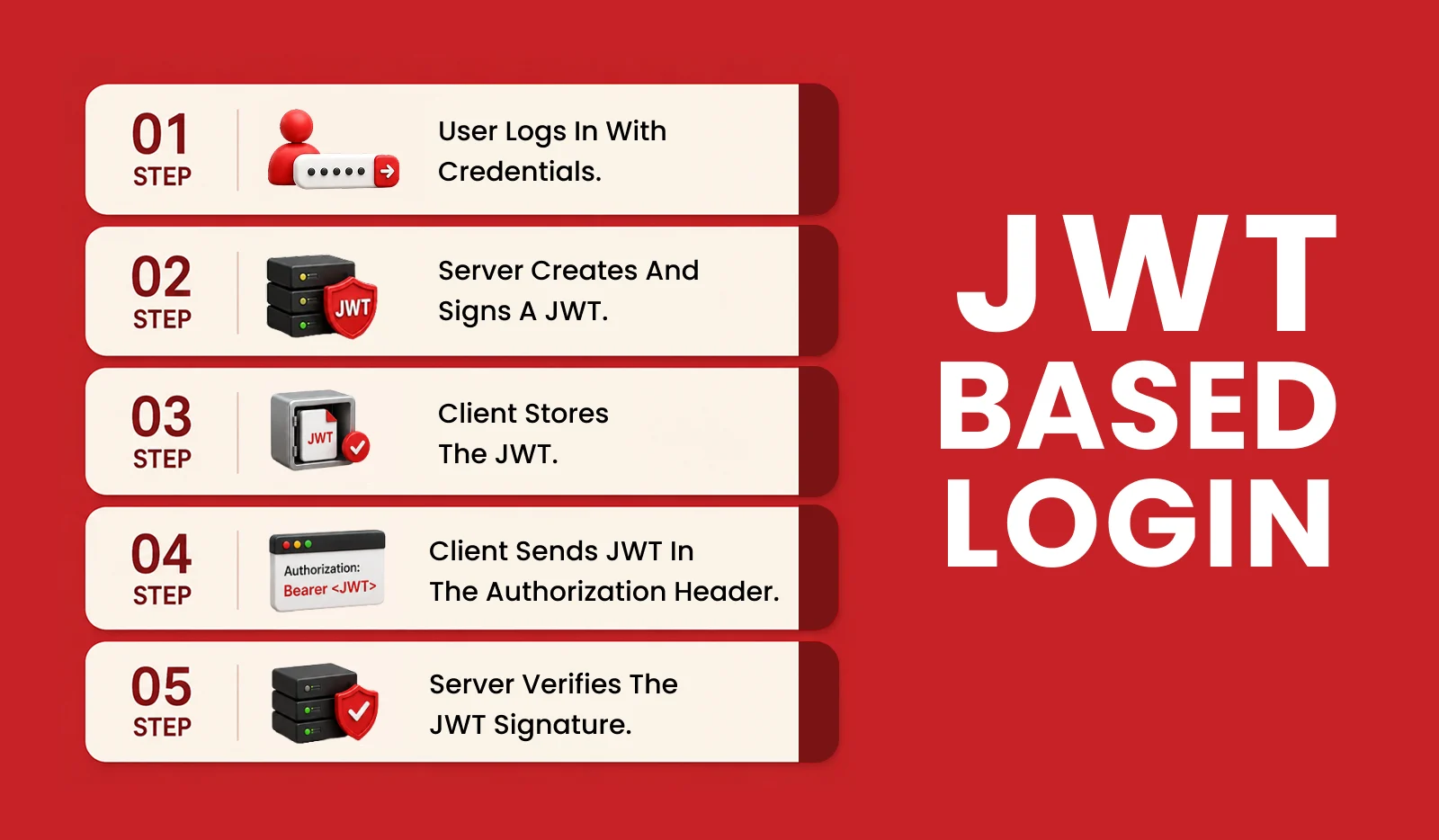
- User logs in with credentials
- Issuer creates a signed JWT.Issuer creates a signed JWT.
- Client stores the JWT (in memory or storage)
- Client includes the JWT in the Authorization: Bearer <token> header.
- The signature will be verified at the server side without having to do any database lookup.
Pros of JWT
- Stateless — scales effortlessly across multiple servers
- Self-contained — carries all user info within the token
- Works great for REST APIs and microservices
- Supports cross-domain requests without CORS complications
Cons of JWT
- Token revocation is difficult — once issued, a JWT is valid until it expires
- Payload is base64-encoded, not encrypted — don’t store sensitive data in it
- Longer tokens increase request payload size
- Requires careful handling of expiration and refresh token logic
JWT Security Best Practices
- Always use short expiration times (15–60 minutes)
- Implement refresh token rotation
- Use HTTPS to prevent token interception
- Store tokens in memory rather than localStorage to reduce XSS exposure
- Never store sensitive data in the JWT payload
When to use it: JWT is ideal for stateless REST APIs, microservices, and mobile applications where scalability and cross-domain requests are priorities.
What Is OAuth 2.0?
OAuth 2.0 is not an authentication protocol, it’s an authorization framework. Provides an ability to use a user’s resources on another service without exposing the user’s password to a third-party application.
OAuth has been used numerous times when you click Sign in with Google” or “Continue with GitHub. In those flows your application will never access the user’s credentials. Rather, it is given an access token by the identity provider.
OAuth 2.0 Key Roles
| Role | Description |
| Resource Owner | The end user |
| Client | Your application |
| Authorization Server | Issues tokens (e.g., Google, Auth0) |
| Resource Server | The API being accessed |
Common OAuth 2.0 Grant Types
- Authorization Code Flow — most secure; best for server-side apps and SPAs with PKCE
- Client Credentials Flow — for machine-to-machine (M2M) communication
- Device Authorization Flow — for devices with limited input (e.g., smart TVs)
- Implicit Flow — deprecated; avoid in new applications
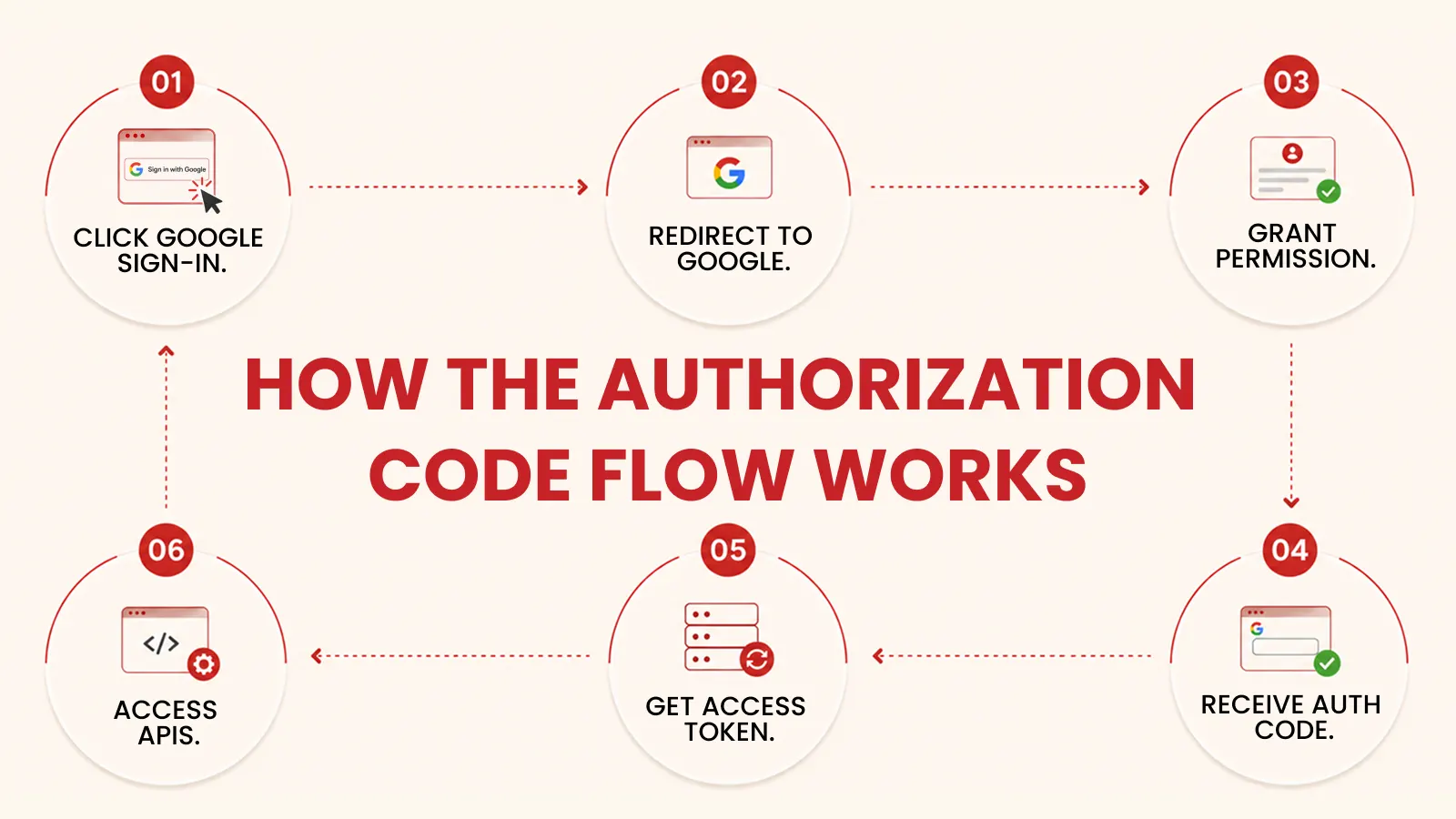
How the Authorization Code Flow Works
- User clicks “Sign in with Google”
- App redirects the user to Google’s authorization server
- User grants permission
- Google redirects back with an authorization code
- App exchanges the code for an access token (and optionally a refresh token)
- App uses the access token to call protected APIs
OpenID Connect (OIDC) — OAuth for Authentication
OAuth 2.0 is only an authorization framework for accessing resources, it doesn’t authenticate the user. This is where OpenID Connect (OIDC) comes in. OIDC is an extension of OAuth 2.0 which issues an ID token (a JWT) in addition to an access token. This ID token is used to validate the user’s identity.
Most modern identity providers (Google, Microsoft, Auth0, Okta) are using OIDC to make logins.
Pros of OAuth 2.0
- Allows secure third-party integration without the need of password sharing
- Provides fine-grained permission scopes
- Tokens can be revoked from the authorization server
- Industry standard – supported by all identity providers
Cons of OAuth 2.0
- Difficult to set up properly; not easy to configure.
- Needs an authorization server (self-hosted or third-party)
- Beware of access tokens in case they are intercepted without HTTPS
- OAuth flows can be a bit tricky to debug.
When to use it: OAuth 2.0 should be used when an app must access another service on a user’s behalf, or when you wish to delegate authentication to another service, such as Google or GitHub.
JWT vs OAuth vs Session-Based Auth: Head-to-Head Comparison
Security Comparison
Session-based auth stores state on the server; which makes it easy to revoke access at the instant. But JWT is stateless — revocation can only be done by denylist or by waiting for the token to expire. OAuth 2.0 strikes a balance: tokens are issued and managed at a separate server (the authorization server) and revocation is easy at that layer.
For most modern apps, all three can be made secure with proper implementation. The differences lie in how revocation, storage, and transport are handled.
Scalability Comparison
Sessions require shared storage across servers. In contrast, JWT is inherently stateless and scales horizontally without coordination. OAuth 2.0 relies on the authorization server, which itself must be scaled — but the resource servers remain stateless.
Therefore, for high-traffic distributed systems, JWT and OAuth-based flows have a clear scalability advantage.
Complexity Comparison
Session-based auth wins on simplicity. Most frameworks handle it out of the box. JWT adds moderate complexity around token lifecycle management. OAuth 2.0 is the most complex — but managed services like Auth0, Clerk, or Firebase Auth abstract most of that complexity away.
How to Implement This in Real Life
Scenario 1: Traditional Web App (e.g., a CMS or admin dashboard)
Use session-based authentication. It’s simple, battle-tested, and fits well with server-rendered pages. Pair it with a Redis store for shared session storage in multi-instance deployments.
// Express + express-session example app.use(session({ secret: process.env.SESSION_SECRET, resave: false, saveUninitialized: false, store: new RedisStore({ client: redisClient }), cookie: { secure: true, httpOnly: true, sameSite: ‘strict’ } }));
Scenario 2: REST API or Mobile App
Use JWT authentication. Issue short-lived access tokens and longer-lived refresh tokens. Rotate refresh tokens on each use to prevent replay attacks.
// Generating a JWT (Node.js + jsonwebtoken) const accessToken = jwt.sign( { userId: user.id, role: user.role }, process.env.JWT_SECRET, { expiresIn: ’15m’ } ); const refreshToken = jwt.sign( { userId: user.id }, process.env.REFRESH_SECRET, { expiresIn: ‘7d’ } );
Scenario 3: “Sign in with Google / GitHub”
Use OAuth 2.0 with OIDC. Delegate authentication to a trusted provider. For rapid development, consider a managed identity provider like Auth0 or Clerk.
// Passport.js + OAuth example (Google) passport.use(new GoogleStrategy({ clientID: process.env.GOOGLE_CLIENT_ID, clientSecret: process.env.GOOGLE_CLIENT_SECRET, callbackURL: ‘/auth/google/callback’ }, async (accessToken, refreshToken, profile, done) => { const user = await findOrCreateUser(profile); return done(null, user); }));
Scenario 4: Microservices Architecture
For service to service communication, use JWT; for machine to machine authorization, use the Client Credentials Flow of the OAuth 2.0 protocol. This ensures that every service remains stateless, but provides a centralized way to access them.
Which Authentication Strategy Should You Choose?
There are no right or wrong answers. This will be different depending on your use case, architecture, and team. However, if you’re looking for guidance on making a decision, here’s a practical guide:
- Choose sessions when creating a server-rendered web application with a single backend and simplicity is key
- Choose JWT If you’re developing a REST API, mobile app, or microservices-style backend that needs stateless scalability, you should go with JWT.
- Choose OAuth 2.0 If you need a third party login, you wish to delegate authentication, or you wish to integrate with external APIs, select OAuth 2.0.
- Combine JWT + OAuth when developing a modern SPA or mobile app with social login and stateless API access requirements
Furthermore, these strategies aren’t mutually exclusive. Many production systems are built using OAuth 2.0 for login (using OIDC) and then issuing JWTs for API access — so this is the best of both worlds.
Key Takeaways
- Session-based auth stores state on the server — simple, easy to revoke, but harder to scale
- JWT is stateless and self-contained — great for APIs and microservices, but revocation is complex
- OAuth 2.0 is an authorization framework — ideal for third-party integrations and delegated access
- OIDC extends OAuth 2.0 to support authentication with ID tokens
- Security depends on correct implementation, not on which strategy you pick
- For most modern apps, JWT + OAuth 2.0 (via OIDC) is the recommended combination
Conclusion
The decision on whether to use jwt vs oauth vs session auth isn’t simply one of popularity, it’s about understanding your system’s needs. Auth still works well with traditional Web applications using a session. JWT is great for stateless, distributed apps. In the meantime, OAuth 2.0 has addressed the tricky issue of delegated, third party authorization.
Most modern production systems combine it: OAuth 2.0 with OIDC for login, JWTs for access to the API, and (optionally) sessions for the server-rendered views. Knowing the pros and cons of each will give you the control you need to ensure your application’s security architecture.
Need Help Choosing the Right Authentication Strategy?
Whether you’re building a SaaS platform, mobile app, API, or microservices architecture, our experts can help you design a secure and scalable authentication system tailored to your business needs.

Satwinder singh
Sr. Software Developer



Explore Related Articles
From JWT security to OAuth implementation, find practical guides for securing modern applications.