
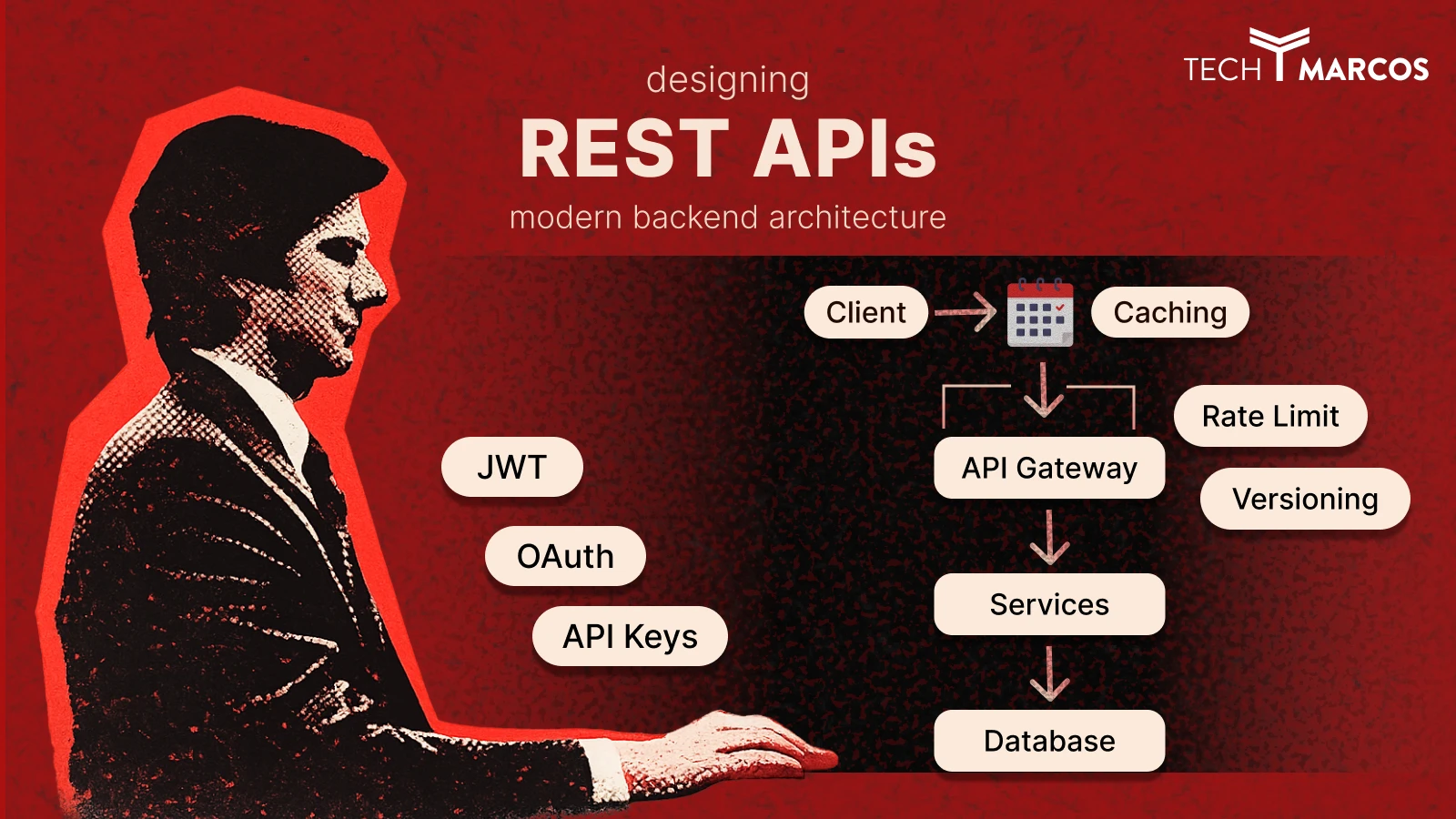
Designing RESTful APIs for Modern Backend Architecture
|
Getting your Trinity Audio player ready...
|
ṁFrom first principles to production-grade architecture — everything junior developers need to get started, and everything senior engineers and architects need to build APIs that scale without breaking.
What Is a RESTful API?
Every time you tap Pay Now on an e-commerce app, refresh your social feed, or log in with Google — a REST API is doing the work in the background. REST has been the backbone of web development for over two decades, and despite the rise of GraphQL, gRPC, and event-driven architectures, it remains the default choice for the vast majority of production APIs built today.
A RESTful API (Representational State Transfer API) is a standardised way for two software systems to communicate over the internet using HTTP. The term “RESTful” means the API follows six architectural rules first defined by computer scientist Roy Fielding in his 2000 doctoral dissertation. Those rules make APIs predictable, scalable, and interoperable — regardless of the programming languages on either side.
But using REST and designing a good REST API are not the same thing. Bad REST API design is one of the most common — and most expensive — sources of technical debt in software projects. Broken URL contracts, inconsistent error responses, missing versioning, absent rate limiting: these are not hypothetical risks. They are everyday realities for teams that didn’t get the architecture right from day one.
The Waiter Analogy
Think of a REST API as a waiter in a restaurant. You (the client) tell the waiter (the API) what you want. The waiter goes to the kitchen (the server), retrieves your order, and brings it back. You never enter the kitchen. REST APIs work the same way — your app asks, the API fetches, the data comes back.
REST vs HTTP — What’s the Difference?
This trips up a lot of developers. REST and HTTP are not the same thing. HTTP is the communication protocol — the rules for how data travels across the internet. REST is an architectural style built on top of HTTP that defines how APIs should behave.
HTTP is the road. REST is the highway code. You can use HTTP without being RESTful. Most REST APIs use HTTP as their transport — but not every HTTP API qualifies as a REST API.
The 6 Core Constraints of REST Architecture
For an API to be truly RESTful, it must satisfy six architectural constraints defined by Fielding. These aren’t arbitrary rules — each one exists to solve a real engineering problem at scale.
| Constraint | What It Means | Why It Matters |
| 1. Stateless | Every request must contain all information the server needs. No session state stored server-side. | Any server instance can handle any request. This is what enables true horizontal scaling. |
| 2. Client-Server | Client handles UI. Server handles data. They operate independently. | Frontend and backend teams can evolve separately without breaking each other’s contracts. |
| 3. Uniform Interface | Consistent URL structure, HTTP methods, and response format across the entire API. | Reduces onboarding time. Any developer can pick up and integrate against it quickly. |
| 4. Cacheable | Responses can be marked cacheable — clients and CDNs can reuse them without hitting your server. | Dramatically reduces load at scale. The highest-leverage performance tool at the API layer. |
| 5. Layered System | Clients don’t know if they’re talking to the origin server or an intermediary. | Enables load balancers, API gateways, and caching layers to be added without client changes. |
| 6. Code on Demand | Servers can optionally send executable code to clients (e.g. JavaScript widgets). | Optional and rarely used in modern REST APIs. |
Most Common Violation — Statelessness
Teams store session data server-side and expect the client to send only a session ID. This creates sticky session dependencies that break horizontal scaling. In a properly stateless REST API, every request must carry its own authentication context — a JWT or API key — so any server can process it independently.
HTTP Methods in REST APIs: GET, POST, PUT, PATCH & DELETE Explained
HTTP methods are the verbs of REST API design. They tell the server what action to perform on a resource. Choosing the right method isn’t just stylistic — it affects caching behaviour, idempotency guarantees, and how your API behaves under retry logic and network failures.
| Method | CRUD Action | Idempotent? | Cacheable? | Use When |
| GET | Read | ✓ Yes | ✓ Yes | Fetching a resource or list of resources |
| POST | Create | ✗ No | ✗ No | Creating a new resource. Requires duplicate detection on retries. |
| PUT | Full Replace | ✓ Yes | ✗ No | Client always sends a complete resource payload. |
| PATCH | Partial Update | Depends | ✗ No | Updating specific fields only. Correct for most update operations. |
| DELETE | Delete | ✓ Yes | ✗ No | Removing a resource. Repeated calls produce the same outcome. |
What Idempotency Means — and Why It Matters in Production
An idempotent method produces the same result whether you call it once or ten times. DELETE /users/123 deletes user 123 the first time. Calling it again doesn’t change the outcome — the user is still gone. This is critical for retry logic: if a request times out, you can safely retry an idempotent method without risk of unintended side effects.
POST is not idempotent. Calling POST /orders three times creates three orders. Payment, order creation, and subscription endpoints must use idempotency keys — client-generated unique identifiers included with each request so the server can detect and ignore duplicate submissions.
PUT vs PATCH — When to Use Each
| PUT | PATCH | |
| What it does | Replaces the entire resource | Updates only the fields you send |
| What you send | Complete resource data | Only the changed fields |
| Risk | Missing fields get wiped to null | Lower risk, more bandwidth-efficient |
| Use when | Client always sends a full payload | Updating a single field, e.g. an email address |
How to Design REST API Endpoints: URL Structure & Resource Naming
Your URL structure is a public contract. The moment a mobile app, a partner, or a third-party developer builds against your endpoint paths, those paths are effectively frozen. Renaming a resource, restructuring a hierarchy, or changing a parameter format is a breaking change — regardless of how justified it is internally. Getting this right from day one is one of the highest-leverage decisions in API design.
Resource Naming: Use Nouns, Not Verbs
URLs represent resources — the things your API manages — not actions. The HTTP method is the verb. The URL is always the noun. This is the most commonly misapplied principle in REST API design.
# Correct — nouns, plural, lowercase, hyphens
GET    /api/v1/users
GET    /api/v1/users/{id}
POST   /api/v1/users
GET    /api/v1/users/{id}/orders
DELETE /api/v1/orders/{id}

# Wrong — verbs in URLs (RPC style, not REST)
POST   /api/getUser
POST   /api/createNewOrder
GET    /api/deleteProduct?id=123

#Wrong — inconsistent casing
GET    /api/userOrders     # camelCase — avoid
GET    /api/user_orders    # snake_case — avoid for URLs
GET    /api/user-orders    # kebab-case — use this
REST API URI Design Rules — Quick Reference
- Use plural nouns: /users not /user, /orders not /order
- Use lowercase with hyphens: /blog-posts not /blogPosts or /blog_posts
- Keep hierarchies shallow — 3 levels maximum before introducing a new top-level resource
- Use UUIDs, not sequential integers — sequential IDs reveal data volume and are enumerable by attackers
- Never include file extensions: /users not /users.json
- Use query parameters for filtering, sorting, and pagination — never for resource identity
When Hierarchy Gets Too Deep
If you’re designing a URL four levels deep — /users/{id}/orders/{id}/items/{id}/reviews — that’s a design signal to create a separate top-level resource. A standalone /order-items/{id} endpoint is cleaner, easier to cache, independently evolvable, and easier to document.
HTTP Status Codes for REST APIs — How to Use Them Correctly
Status codes communicate the outcome of every request. Caches, proxies, monitoring systems, and retry logic all depend on them to behave correctly. Two of the most damaging mistakes in production: returning 200 OK when something has actually failed, and returning 500 for client mistakes.
| Code | Name | When to Use It |
| 200 | OK | Successful GET, PUT, or PATCH with a response body. |
| 201 | Created | Successful POST. Always include a Location header pointing to the new resource. |
| 204 | No Content | Successful DELETE or PUT with nothing to return. |
| 400 | Bad Request | Client sent invalid data — missing fields, wrong types, malformed JSON. |
| 401 | Unauthorized | Not authenticated. Token is missing, expired, or invalid. About identity. |
| 403 | Forbidden | Authenticated, but not authorised for this resource. About permission. |
| 404 | Not Found | The resource does not exist at this URI. |
| 409 | Conflict | State conflict — duplicate resource, optimistic concurrency lock failure. |
| 422 | Unprocessable Entity | Valid JSON format, but fails business validation (e.g. banned email domain). |
| 429 | Too Many Requests | Rate limit exceeded. Always include a Retry-After header. |
| 500 | Internal Server Error | Unexpected server failure only. Never return this for a client mistake. |
| 503 | Service Unavailable | Server temporarily down. Use during deployments or dependency outages. |
REST API Error Handling Best Practices
Error handling is where most APIs fail their developers. A bare string, a vague “something went wrong”, or worst of all a 200 OK with an error buried in the body — these create debugging pain, inconsistent integrations, and support burden that compounds over time. Every error response across your entire API should follow the same envelope structure. A developer integrating any endpoint should never have to guess how to parse an error or where to find the relevant detail
// Standard error response envelope — use this consistently across your entire API
{
  "error": {
    "code":    "VALIDATION_ERROR",             // Machine-readable — switch on this in client code
    "message": "Request validation failed.",   // Human-readable explanation
    "details": [                               // Field-level breakdown for form UIs
      { "field": "email",  "issue": "Must be a valid email address." },
      { "field": "phone",  "issue": "Phone number is required." }
    ],
    "requestId": "req_01HX9B3KD4",             // Ties directly to your server logs
    "docsUrl":   "https://api.example.com/errors#VALIDATION_ERROR"
  }
}
Always Include requestId
A requestId in every response — success and failure alike — is one of the single highest-value additions you can make to an API. When a user reports a problem, your team can find the exact request in your logging system immediately. Without it, debugging requires reconstructing events from timestamps and vague descriptions — a process that takes hours instead of seconds. Link to Documentation Include a documentation URL in error responses pointing to a page explaining the specific error code. A developer who can read exactly what RATE_LIMIT_EXCEEDED means and how to handle it needs no support ticket. Small addition, big reduction in support burden.
REST API Authentication: JWT, OAuth 2.0, and API Keys Compared
Authentication is how your API verifies who is making a request. Authorisation is how it determines what that identity is permitted to do. These are two separate concerns. Conflating them is one of the most common sources of security vulnerabilities in REST APIs — and one of the most difficult to untangle after the fact.
| Method | Best For | Strengths | Weaknesses |
| API Keys | Server-to-server, internal tools | Simple, fast to validate | Static — hard to revoke granularly, carries no identity claims |
| JWT | SPAs, mobile backends | Stateless, no DB lookup per request, carries user claims | Can’t be revoked before expiry without extra infrastructure |
| OAuth 2.0 | Third-party integrations, social login | Revocable, fine-grained scopes, industry standard | More complex to implement and maintain correctly |
| Session-Based | Traditional server-rendered web apps | Simple, easy to revoke | Doesn’t scale horizontally without sticky sessions or shared store |
How JWT Authentication Works in REST APIs
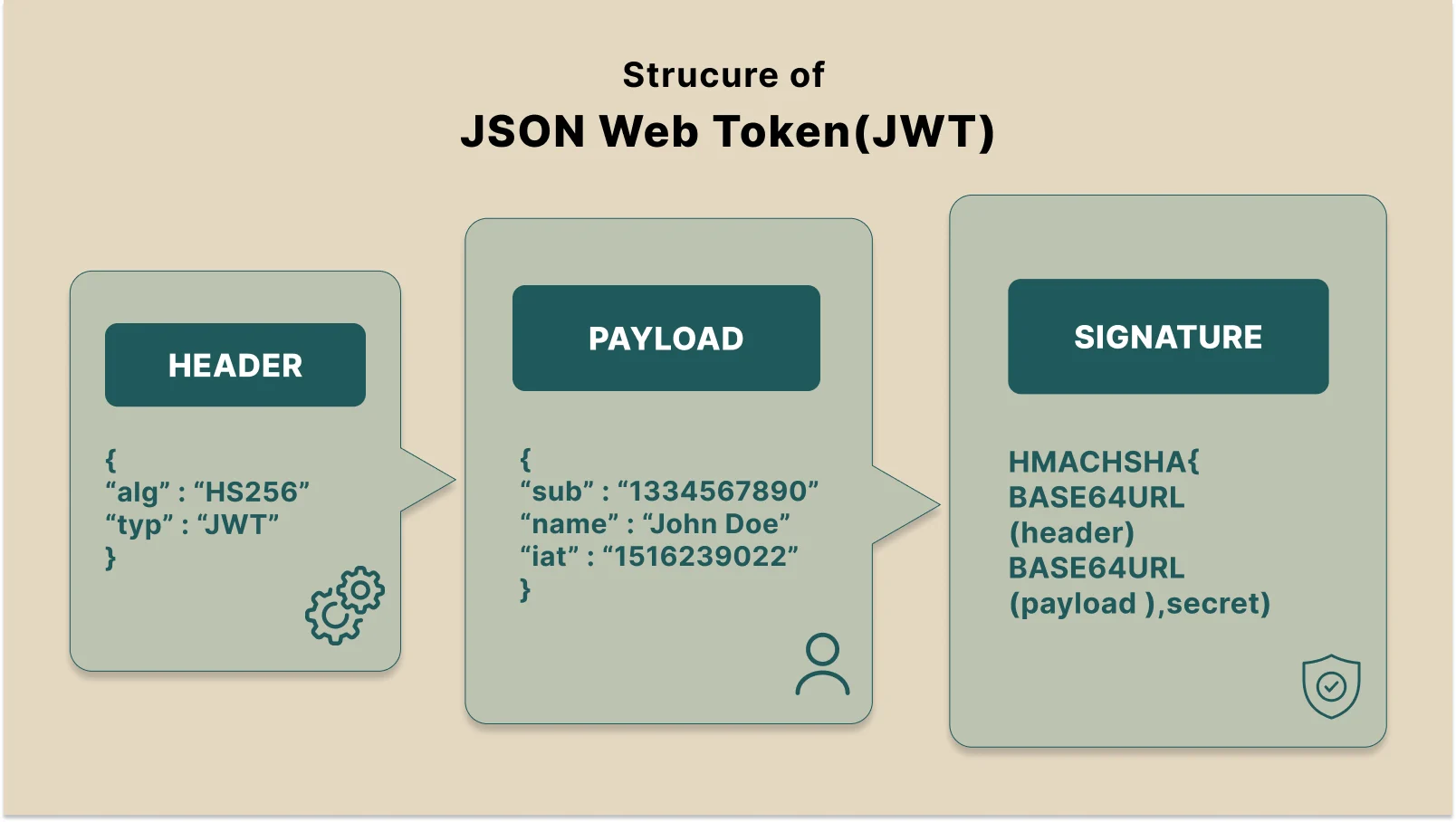
JWT is the most widely used authentication method for modern REST APIs. A JWT is a self-contained token that encodes user claims — their ID, roles, and permissions — cryptographically signed by the server. Because all necessary information is in the token itself, no database lookup happens on each request. That’s what makes JWT stateless and horizontally scalable.
The production-standard pattern pairs short-lived access tokens (15–60 minutes) with long-lived refresh tokens (7–30 days). The access token travels in the Authorization header. The refresh token lives in an HTTP-only, Secure cookie where JavaScript cannot read it — protecting against token theft via XSS attacks.
When the access token expires, the client silently exchanges the refresh token for a new one. The user never experiences an interruption. This cycle continues invisibly across the session.
// JWT auth flow — the complete production pattern

// Step 1: User logs in
POST /api/v1/auth/login
{ "email": "user@example.com", "password": "..." }

// Step 2: Server responds with tokens
{ "accessToken": "eyJhbGciOiJIUzI1NiJ9...", "expiresIn": 900 }
// + HTTP-only Secure cookie: refreshToken=...    (7-30 days)

// Step 3: Client sends access token on every request
GET /api/v1/users/me
Authorization: Bearer eyJhbGciOiJIUzI1NiJ9...

// Step 4: When access token expires, client refreshes silently
POST /api/v1/auth/refresh
// Server reads refresh token from cookie, issues new access token

// ⚠️ Always specify the algorithm explicitly when verifying tokens
jwt.verify(token, process.env.JWT_SECRET, { algorithms: ['HS256'] });
// Libraries that accept 'alg: none' from the token header can be
// manipulated to bypass signature verification — a real attack vector.
REST API Versioning Strategies
Every production API changes over time. The question isn’t whether you’ll need to make breaking changes — it’s whether your versioning strategy gives you room to do so without fracturing existing integrations. Version from day one. Retrofitting versioning after external consumers exist is one of the most painful API migrations a team can face.
| Strategy | Example | Best For | Verdict |
| URL Path | /api/v1/users | Public APIs, mobile backends, partner integrations | ✅ Recommended default — explicit, visible in logs, easy to test |
| Request Header | Accept: application/vnd.api+json;version=2 | Internal APIs where clean URLs matter | ⚠️ Harder to test and invisible in standard server logs |
| Query Param | /api/users?version=1 | Simple internal tooling only | ❌ Avoid — interferes with HTTP caching and CDN configuration |
What Counts as a Breaking Change
Many accidental breaking changes happen because teams lack a shared definition. The following all require a version increment:
- Removing any field from a response body — even one you think no consumer uses
- Renaming a field or changing its data type
- Changing an endpoint URL or HTTP method
- Adding a new required request field or parameter
- Modifying your error response structure
- Changing your authentication scheme or token format
Safe non-breaking changes that don’t require a version bump: adding optional fields to responses, adding optional request parameters, and introducing entirely new endpoints.
Deprecation Best Practice
Use Deprecation and Sunset HTTP response headers to notify consumers of upcoming changes before they happen. Maintain at least one previous major version for a documented support period after shipping a new one. Document every deprecation with a sunset date and a clear migration guide — never surprise your consumers with breakage.
REST API Pagination Techniques

A collection endpoint that returns 50 records in development may return 500,000 in production. Without pagination, a single request can exhaust your database connection pool, overwhelm server memory, and time out the client — simultaneously. Pagination is not an optimisation you add later. It’s a mandatory design requirement for any endpoint that returns a list.
| Type | How It Works | Use When | Avoid When |
| Offset | ?page=3&limit=20 — page number plus page size | Small stable datasets; UI needs visible page numbers | High-volume feeds — inserts/deletes between pages cause duplicated or skipped records |
| Cursor | ?cursor=eyJpZCI6M…&limit=20 — opaque pointer to last seen item | Feeds, timelines, order histories, frequently-changing data | You need user-visible page numbers or random page access |
// Cursor-based pagination response envelope
{
  "data": [ /* array of resource objects */ ],
  "pagination": {
    "hasNextPage":     true,
    "nextCursor":      "eyJpZCI6MTAwfQ==",  // Base64-encoded pointer to next page
    "hasPreviousPage": false,
    "previousCursor":  null,
    "totalCount":      4821                 // Omit at high scale — COUNT is expensive
  }
}

// Client fetches next page
GET /api/v1/orders?cursor=eyJpZCI6MTAwfQ==&limit=20
On Total Counts
Avoid returning totalCount on large datasets. A COUNT(*) query on a table with millions of rows is expensive and rarely necessary for the actual user experience. Most feeds and lists don’t need a “showing 1 of 4,821 results” indicator. Only add it when the UI genuinely requires it.
Designing Scalable REST APIs for Production
The difference between a REST API that holds up under production load and one that becomes a liability six months after launch is rarely about your framework or programming language. It’s about the architectural decisions made before a single line of code was written — and the shortcuts taken that couldn’t be undone later.
This section covers the patterns that define how serious engineering teams design, secure, and operate REST APIs at scale. These aren’t textbook abstractions. They’re the decisions that determine whether your API is an asset or a bottleneck when traffic grows, teams expand, and requirements evolve far beyond day one.
Security Architecture for Production REST APIs
Security in a REST API is not a feature you add in the final sprint before launch. It’s a series of architectural decisions that compound across authentication, transport, input handling, and abuse prevention. The patterns below are the minimum viable security baseline for any API accepting external traffic.
1. HTTPS Everywhere — Zero Exceptions
Every REST API must be served exclusively over HTTPS. HTTP transmits tokens, credentials, and user data in plaintext. Any network observer between your client and server can read everything. HTTPS is free via Let’s Encrypt and enabled at the infrastructure layer on every major cloud provider. There is no legitimate justification for accepting HTTP traffic in 2026.
Enforce HTTPS at the load balancer or API gateway level. Issue HTTP Strict Transport Security (HSTS) headers on all responses. Redirect HTTP to HTTPS at the infrastructure layer — never in application code.
2. Distributed Rate Limiting
Without rate limiting, a single misbehaving client can exhaust your API for every legitimate consumer simultaneously. Rate limiting protects against credential stuffing, DDoS amplification, scraping, and the general class of abuse where a caller treats your API as an unlimited resource.
// Express + Redis rate limiting — distributed, production-safe
const rateLimit = require('express-rate-limit');
const RedisStore = require('rate-limit-redis');

const apiLimiter = rateLimit({
  windowMs: 60 * 1000,      // 1-minute window
  max: 100,                 // Requests per window per key
  standardHeaders: true,    // Returns RateLimit-* headers (RFC 6585)
  legacyHeaders: false,
  store: new RedisStore({ client: redisClient }), // Works across all instances
  keyGenerator: req => req.user?.id ?? req.ip,    // Per-user, not just per-IP
  handler: (req, res) => res.status(429).json({
    error: {
      code: 'RATE_LIMIT_EXCEEDED',
      message: 'Too many requests. Please retry after the window resets.',
      retryAfter: Math.ceil(req.rateLimit.resetTime / 1000)
    }
  })
});
Use Redis, Not In-Memory
In-memory stores reset on every deployment and don’t synchronise across horizontally scaled instances. With three app servers, each has its own counter — effectively tripling your rate limits. Redis adds sub-millisecond latency and works correctly whether you have one server or one hundred. Set this up from day one. Retrofitting it into a live production system under traffic is painful.
3. Server-Side Input Validation — Never Trust Client Data
Client-side validation improves user experience. Server-side validation protects your system. These are complementary — never treat frontend validation as a substitute for backend validation. Every field in every request must be validated server-side: type, format, length, acceptable range, and business rules.
- Validate request body schema using a library — Zod, Joi, or express-validator
- Reject or strip requests containing undeclared extra fields
- Set explicit maximum payload size limits at the HTTP server level
- Sanitize all string inputs before storing or reflecting them back to clients
- Apply the same rigour to query parameters and path parameters as to request bodies
4. Secrets Management and Credential Hygiene
API secrets, JWT signing keys, database credentials, and third-party API keys must never appear in source code, version history, or deployment logs. Use a dedicated secrets manager — AWS Secrets Manager, HashiCorp Vault, or GCP Secret Manager. Implement automatic rotation where supported. Treat a leaked credential as a compromised system: revoke immediately, rotate, then audit access logs to understand the full blast radius.
5. CORS — Lock Down Your Cross-Origin Policy
Configure CORS explicitly and conservatively. Allow only the specific origins with a legitimate reason to access your API. A wildcard Access-Control-Allow-Origin is appropriate only for fully public, unauthenticated APIs. For any API handling authentication, personal data, or write operations, a wildcard CORS policy is a security misconfiguration — not a convenience.
REST API Performance Optimisation
Performance in production REST APIs is driven by four architectural factors: caching strategy, payload efficiency, connection management, and database query patterns. The first three are fully within your control at the API design layer.
HTTP Caching — The Highest-Leverage Optimisation
Correctly configured Cache-Control headers can eliminate backend calls entirely for resources that change infrequently. This is the single highest-leverage performance optimisation at the API layer — it reduces database load, lowers costs, and improves response times for every consumer simultaneously, without any changes to client code.
// Cache-Control patterns for common resource types

// Public — CDN and browser cacheable (product catalogues, public data)
res.set('Cache-Control', 'public, max-age=300, stale-while-revalidate=60');

// Private — browser-only cache (user-specific responses)
res.set('Cache-Control', 'private, max-age=60');

// No cache — authentication, payments, all write operations
res.set('Cache-Control', 'no-store');

// Conditional request with ETag — saves bandwidth on repeat reads
const etag = generateETag(data);
if (req.headers['if-none-match'] === etag) {
  return res.status(304).end(); // No body — fast and cheap
}
res.set('ETag', etag);
res.json(data);
Application-Layer Caching with Redis
For dynamic data that changes too frequently for HTTP caching but is read far more often than it’s written, a Redis application cache gives precise control over TTL and invalidation. Even a 30-second TTL on a high-read endpoint can absorb enormous traffic spikes without the request reaching your database.
- Use cache-aside (lazy loading): check cache first, populate on miss, serve on hit
- Invalidate cache synchronously on successful writes — never serve stale data after a confirmed update
- Include user context in cache keys — cross-user data leakage via caching is one of the most serious bugs in multi-tenant systems
- Keep TTLs short for frequently-changing data. Long TTLs are appropriate only for genuinely stable reference data
Response Compression
Enable gzip or Brotli compression on all JSON responses. For typical REST API payloads, compression reduces transfer size by 70 to 85 percent. It’s a single configuration setting in every major web framework. All modern HTTP clients support it. There is no downside to enabling it.
Connection Pooling and Database Query Patterns
At scale, one of the most common API performance bottlenecks is database connection management. Opening a new connection per request can add 50ms or more of latency before your query even begins. Configure connection pooling at the infrastructure level and size your pool for your workload. Add query instrumentation early — slow queries invisible at low traffic become existential problems at scale. Catching them during development is dramatically easier than finding them retroactively in a live system.
API Gateway and Microservices Architecture Patterns
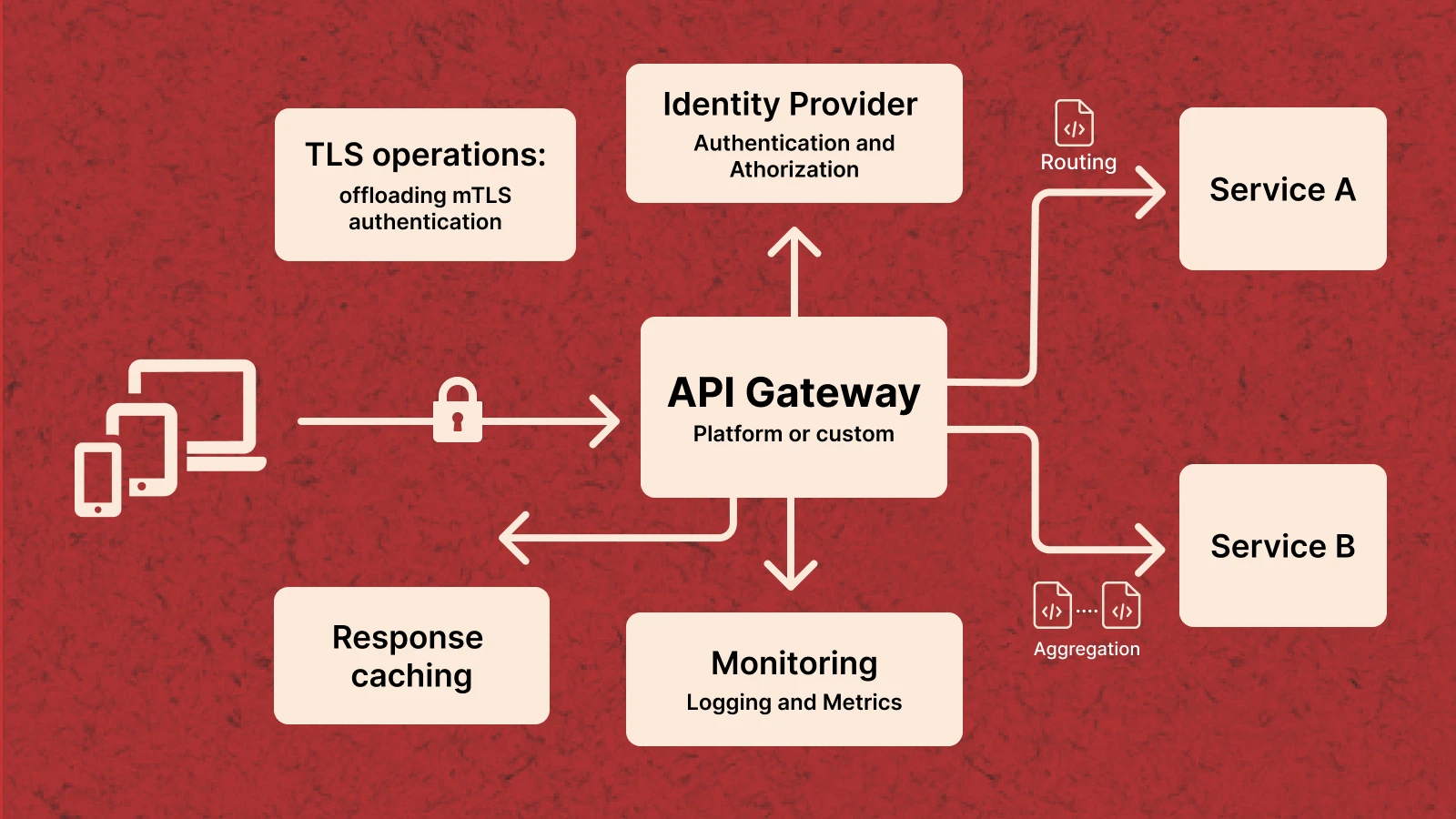
As systems grow beyond a single service, direct client-to-service communication becomes a scaling and operational liability. An API Gateway — whether AWS API Gateway, Kong, Nginx, or a custom implementation — centralises the cross-cutting concerns that would otherwise be duplicated across every microservice: authentication, rate limiting, routing, SSL termination, logging, and observability. The gateway becomes the single entry point for all external traffic, freeing individual services to focus entirely on domain logic.
The Backend for Frontend (BFF) Pattern
When your API serves multiple consumer types — a web app, an iOS app, an Android app, and a partner integration — their data requirements diverge and grow further apart over time. A web dashboard needs rich, aggregated data. A mobile app needs lightweight, bandwidth-conscious payloads. A partner needs a different authentication model and rate tier. The BFF pattern introduces a dedicated API layer per consumer type, each optimised for its specific client, while sharing a common set of downstream services for data and business logic. This avoids the lowest-common-denominator problem: the painful situation where a single general-purpose endpoint is too bloated for mobile, too sparse for the dashboard, and too rigid for partners.
Asynchronous Endpoints — The Async Request/Reply Pattern
Not every operation should complete within a synchronous request-response window. Long-running operations — PDF generation, video transcoding, bulk exports, ML inference — should not hold an HTTP connection open for their duration. Return a 202 Accepted immediately with a job ID and a status URL. Queue the work. The client polls the status endpoint at a reasonable interval, or receives a webhook when the job completes. This keeps API response times predictable, prevents connection timeout issues, and enables better resource utilisation for expensive workloads.
Observability: Structured Logging, Distributed Tracing & Alerting
An API you cannot observe is an API you cannot operate reliably. Every request should emit structured JSON logs that include at minimum: requestId, authenticated user ID, endpoint, HTTP method, response status, and end-to-end latency. Correlate logs across service boundaries using a shared trace ID — OpenTelemetry is the current standard for distributed tracing across polyglot microservice architectures. Define service level objectives for latency and error rate before incidents occur. Configure automated alerts on SLO breaches. Review dashboards proactively — not only when users report problems. Observability is not a nice-to-have. It’s a fundamental architectural requirement for any system you intend to own and operate reliably.
RESTful API Design Best Practices: Complete Reference
The following is a consolidated reference of REST API design best practices drawn from real-world production systems. These are the decisions that separate APIs that remain maintainable over years from those that accumulate breaking changes and technical debt after the first major iteration.
Naming and URL Structure
- Always use plural nouns for resource collections
- Use kebab-case for multi-word resource names
- Use UUIDs for all public-facing resource identifiers — sequential IDs are trivially enumerable
- Keep URL hierarchies to a maximum of three levels
- Filter, sort, and paginate via query parameters — never via URL segments
- Never include verbs in URLs — the HTTP method is the verb
Request and Response Design
- Always return an explicit Content-Type header on all responses
- Use ISO 8601 format for all date and time values
- Separate data from pagination metadata in a consistent top-level envelope for all collections
- Never include raw stack traces or internal database field names in responses
- Return null for missing optional fields — don’t omit them. Clients rely on consistent field presence
- Use snake_case for JSON field names — the most widely adopted convention across REST ecosystems
Security
- Enforce HTTPS at the infrastructure level with HSTS headers on all responses
- Never log authentication tokens, passwords, or sensitive PII — scrub at the middleware level
- Implement least-privilege authorisation — check permissions on every request, not just at login
- Validate the Content-Type of incoming requests to prevent MIME confusion attacks
- Rotate JWT signing keys on a regular schedule with a rotation mechanism that requires no downtime
Versioning and API Evolution
- Version your API from day one — before any external consumer exists
- Use URL path versioning for all public APIs
- Document every deprecation with a sunset date and migration guide well in advance of removal
- Maintain at least one previous major version for a documented support period after shipping a new one
- Use Deprecation and Sunset HTTP headers to notify consumers proactively
Documentation
- Maintain an OpenAPI specification as a first-class repository artifact — reviewed in pull requests
- Update the spec before an endpoint ships, not after
- Document all error codes with descriptions, causes, and resolution steps
- Provide runnable request and response examples with realistic payloads for every endpoint
- Publish a public changelog covering breaking changes, features, and deprecations with accurate timestamps
Testing and Contract Compliance
- Write contract tests that verify your live implementation matches your published OpenAPI spec
- Test idempotency explicitly — call every idempotent endpoint twice and assert identical outcomes
- Load test collection endpoints with realistic data volumes before deploying — 100 records is not 100,000
- Use canary deployments for any change that could affect existing consumers
REST API Pre-Ship Checklist
Use this before shipping any new endpoint or modifying an existing API surface. These are the decisions most commonly skipped under deadline pressure — and most frequently responsible for production incidents six months later.
| ✓ | Checkpoint | Category |
| ☐ | Resource names use nouns, plural, lowercase, with hyphens | Naming |
| ☐ | HTTP verb correctly matches the semantic intent of the operation | HTTP Semantics |
| ☐ | All success responses return the correct 2xx status code | Error Handling |
| ☐ | All error responses follow the consistent envelope structure | Error Handling |
| ☐ | Every request log entry and error response includes a requestId | Observability |
| ☐ | Structured logs emit method, status, endpoint, and latency | Observability |
| ☐ | Authentication is required on all non-public endpoints | Security |
| ☐ | JWT algorithm is explicitly specified in token verification | Security |
| ☐ | All string inputs are validated for type, format, and length | Security |
| ☐ | Rate limiting is configured using Redis (not in-memory) | Security |
| ☐ | All collection endpoints support pagination | Performance |
| ☐ | Cache-Control headers are correctly set for cacheable responses | Performance |
| ☐ | Response compression (gzip/Brotli) is enabled | Performance |
| ☐ | Breaking changes are documented and a version increment applied if necessary | Versioning |
| ☐ | OpenAPI specification updated before the endpoint is deployed | Documentation |
REST vs GraphQL: Which Should You Choose in 2026?
GraphQL has been positioned as REST’s successor for several years. In practice, the two solve different problems — and the choice is as much a business and team decision as a technical one. Understanding the real trade-offs prevents both over-engineering and under-serving your consumers.
| Factor | REST | GraphQL |
| Learning curve | Low — HTTP methods and JSON are universal | Higher — schema, resolvers, query language to learn |
| Data fetching | Fixed response shapes per endpoint | Client declares exactly the fields it needs per query |
| Overfetching | Common — endpoints return all fields regardless | Eliminated — clients request only what they need |
| Underfetching | Common — multiple requests may be needed | Solved — single query can span multiple resources |
| HTTP Caching | Simple — standard CDN and browser caching work natively | Complex — requires persisted queries and custom CDN config |
| Authorisation | Endpoint-level — straightforward to implement | Field-level — more complex, requires explicit tooling |
| N+1 queries | Managed via query optimisation at the endpoint level | Requires DataLoader or equivalent batching infrastructure |
| Tooling maturity | Mature — 20+ years of monitoring and integration tools | Growing fast, but less mature than REST ecosystem |
| Best for | Public APIs, microservices, CRUD-heavy systems | Multiple client types with genuinely different data needs |
Honest Recommendation Start with REST. It’s simpler to build, straightforward to cache at the HTTP layer, supported by two decades of mature tooling, and understood by every developer you’ll hire. Move to GraphQL only when you have multiple consumer types with meaningfully different data requirements — and the complexity is justified by real, measured problems. Architectural complexity should be earned, not assumed at the start of a project.
Planning a New Backend Architecture?
Choosing the right API architecture early can prevent years of painful refactoring later.
If you’re building a SaaS platform, mobile backend, or microservices architecture, our team can help you design REST APIs that are secure, scalable, and ready for production traffic.

Saurabh Sharma
Sr. Software Engineer



Related API Design Guides & Backend Architecture Insights
Explore practical guides on REST API design, authentication, scalability, and modern backend architecture patterns.



Frequently Asked Questions

What is a RESTful API and how does it differ from a regular HTTP API?
A RESTful API is a web API that follows six architectural constraints defined by Roy Fielding in 2000: statelessness, client-server separation, uniform interface, cacheability, layered system, and optional code on demand. A regular HTTP API simply uses HTTP as a transport protocol without necessarily following these constraints. The distinction matters because the REST constraints — particularly statelessness and cacheability — are what give APIs their scalability and interoperability characteristics. An API can use HTTP correctly and still not be RESTful if it stores server-side session state, uses inconsistent URL structures, or returns non-standard status codes.
What HTTP methods are used in REST APIs and when should you use each?
The five core HTTP methods are GET (read), POST (create), PUT (full replace), PATCH (partial update), and DELETE (remove). GET and DELETE are idempotent — safe to retry. POST is not — calling it twice creates two resources, which is why payment and order endpoints need idempotency keys. Use PATCH for most update operations. Reserve PUT for cases where the client always sends a complete resource payload. All five are semantically meaningful to caches, proxies, and monitoring systems — using them correctly matters beyond style.
What is the best REST API versioning strategy?
URL path versioning — embedding v1 or v2 directly in the URL path — is the recommended default for public-facing REST APIs. It is explicit, visible in server logs, easy to document, and immediately obvious to any developer. Header versioning is cleaner aesthetically but harder to test. Query parameter versioning should be avoided entirely — it interferes with HTTP caching. The most important rule: version your API from day one, before any external consumer exists. Retrofitting versioning after the fact is one of the most painful API migrations a team can face.
How does REST API authentication work — JWT vs OAuth 2.0 vs API Keys?
The three main mechanisms serve different use cases. API Keys are simple static tokens suited for server-to-server communication. JWTs are self-contained tokens carrying user claims with no DB lookup needed per request — the standard for SPAs and mobile backends, using short-lived access tokens paired with HTTP-only refresh tokens. OAuth 2.0 is the industry standard for third-party integrations and social login, providing revocable scoped access across system boundaries. Most production systems use JWT for internal authentication and OAuth 2.0 for third-party integrations.
What is the difference between cursor-based and offset pagination?
Offset pagination uses a page number and page size. It is simple and supports random page access, but breaks when records are inserted or deleted between requests — causing duplicated or skipped items. Cursor-based pagination uses an opaque pointer to the last item seen, making it resilient to data changes. Cursor pagination is the correct choice for feeds, order histories, audit logs, and any high-volume, frequently-changing dataset. Use offset pagination only for small, stable datasets where visible page numbers add genuine value to the user experience.
How do you secure a REST API against common attack vectors?
REST API security requires multiple overlapping layers: HTTPS for all traffic without exception, JWT or OAuth authentication with explicitly specified algorithms, distributed Redis rate limiting to prevent brute force and DDoS, rigorous server-side input validation and sanitization on every endpoint, least-privilege authorisation where users can only access their own resources, conservative CORS configuration, and security response headers. Security is a design decision made before coding begins — not a checklist added the sprint before launch.
What counts as a breaking change in a REST API?
A breaking change is any modification that causes an existing, correctly-implemented client to fail or behave incorrectly. This includes: removing any field from a response body, renaming a field or changing its type, changing an endpoint URL or HTTP method, adding a required request parameter, modifying error response structure, and changing the authentication scheme. Safe non-breaking changes include adding optional fields to responses, adding optional request parameters, and introducing new endpoints. Every team building a public or partner-facing API should define and document their breaking change policy before the first external consumer goes live.
REST vs GraphQL — which should you choose for a new API in 2026?
Start with REST unless you have a specific, demonstrated reason not to. REST is simpler to build, straightforward to cache at the HTTP layer, supported by two decades of mature tooling, and understood by every developer you’ll hire. GraphQL’s strengths — eliminating overfetching and enabling flexible client-driven queries — become meaningful when you have multiple client types with genuinely different data needs. The risk with GraphQL is added complexity around caching, field-level authorisation, and query cost management that must be earned through real requirements, not anticipated ones. For public APIs, microservices, and CRUD-heavy systems, REST is the stronger default in 2026.